Workflow editor at a glance
The workflow editor interface consists of the following elements:
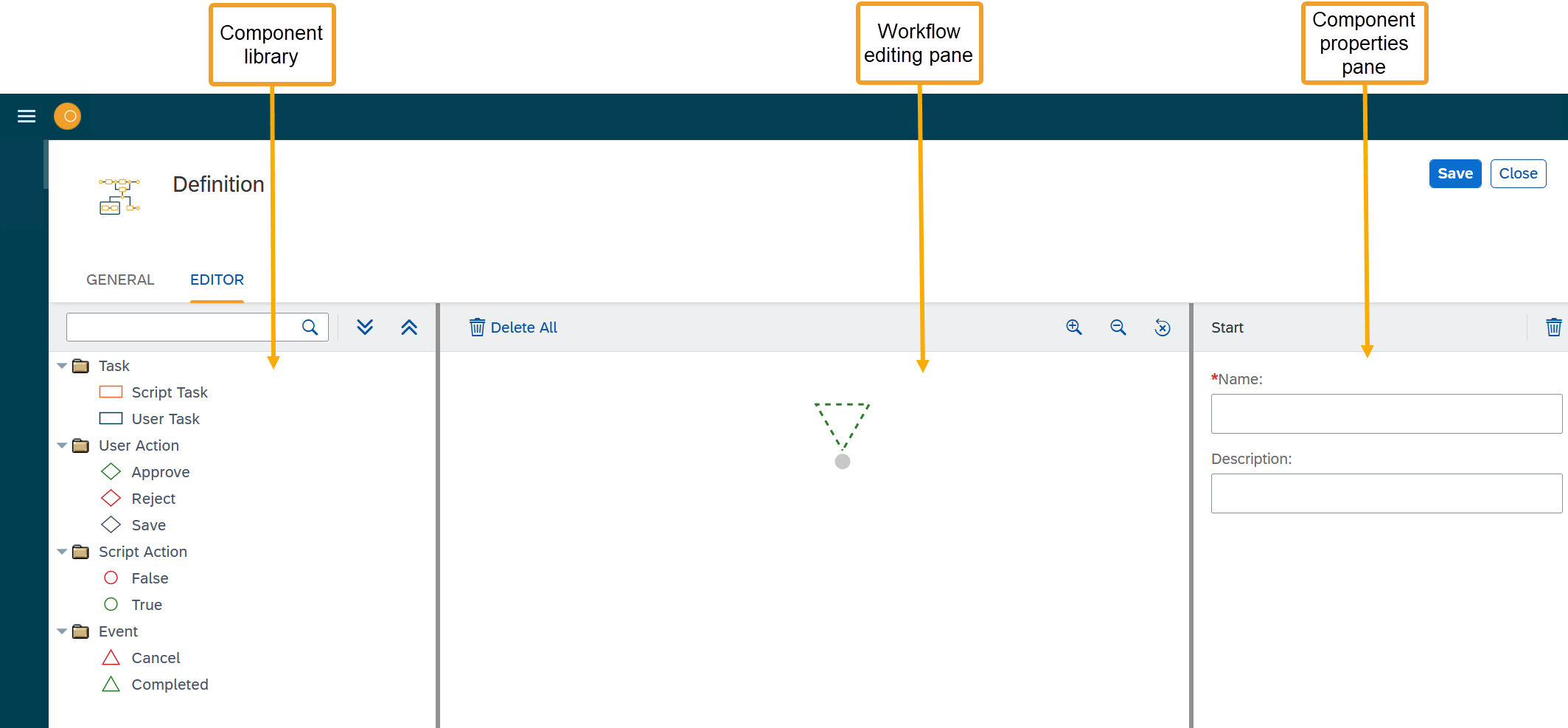
Task
A task is an activity executed by a script or a user.
Script task
A script task is used when you want the system to execute a server script. This could be used, for example, to process an input from the workflow context and store the output as a variable. In the component properties pane, you define the following properties for a server script:
- Name
-
Name of the script task.
- Description
-
Description of the script task.
- Server script
-
Server script that is stored in the system and that is executed during the workflow.
// Get Data from Workflow, object number/type, value, currency etc.
log.info(JSON.stringify(wfData));

// Set processing true/false - Use 'True' or 'False'. From 2.0.0 boolean values are supported
wfData.result = 'False';
complete();
User task
A user task is used when you want a user of your system to execute a certain activity. This could be used, for example, to approve an order or invoice.
- Name
-
Name of the user task.
- Description
-
Description of the user task.
- Max Processing time
-
Maximum amount of time a user needs to perform the task. The max processing time is measured in milliseconds.
- Inbox Application
-
Application where the user receives notifications to perform a task. Default is the
Universal Inboxwidget in the launchpad. - Approver Determination
-
Select the approver for the user task.
- Task Action
-
Selection of the task action for the user task.
- Custom Script Determination
-
Add server scripts as step in the background jobs. Any scripts generated in the system can be added here.
- Enable Forward
-
Allow the approver to forward the task.
- Enable Query
-
Allow the approver to send a query.
- Enable Notification
-
Allow the approver to enable task notifications.
- Task Notification
-
Select the notification which need to be sent with the user task.
- Sender eMail
-
Email address from which the user task is sent.
User action
Actions for a user to perform during a script task or a user task.
- Approve
-
The user approves the task.
- Reject
-
The user rejects the task.
- Save
-
The user saves the state of the workflow.
Script action
Result for a server script during a script task.
- False
-
If the server script fails.
- True
-
If the server script succeeds.
Event
Events to mark the end of a workflow.
- Cancel
-
Event to cancel the workflow if it has failed.
- Complete
-
Event to complete and close the workflow if it has succeeded.